
Ai Content Generator
Ai Picture
Tell Your Story

 InVastor Academy Professionals
Module 3: AI in Content Creation for Education Lesson 3.3: Using Canva Magic Write, Notion AI, and ChatGPT in Teaching
Module 3: AI in Content Creation for Education
Lesson 3.3: Using Canva Magic Write, Notion AI, and ChatGPT in Teaching
Learning Objectives
By the end of this lesson, educators will be able to:
- Use ChatGPT to generate instructional materials and facilitate learning support.
- Use Canva Magic Write to produce visually engaging classroom content.
- Use Notion AI to organize lesson notes, curriculum plans, and student documentation.
- Evaluate and refine AI-generated content for accuracy, clarity, and educational value.
- Integrate these tools into daily teaching workflows efficiently and ethically.
1. Overview: Why These Three Tools Matter for Educators
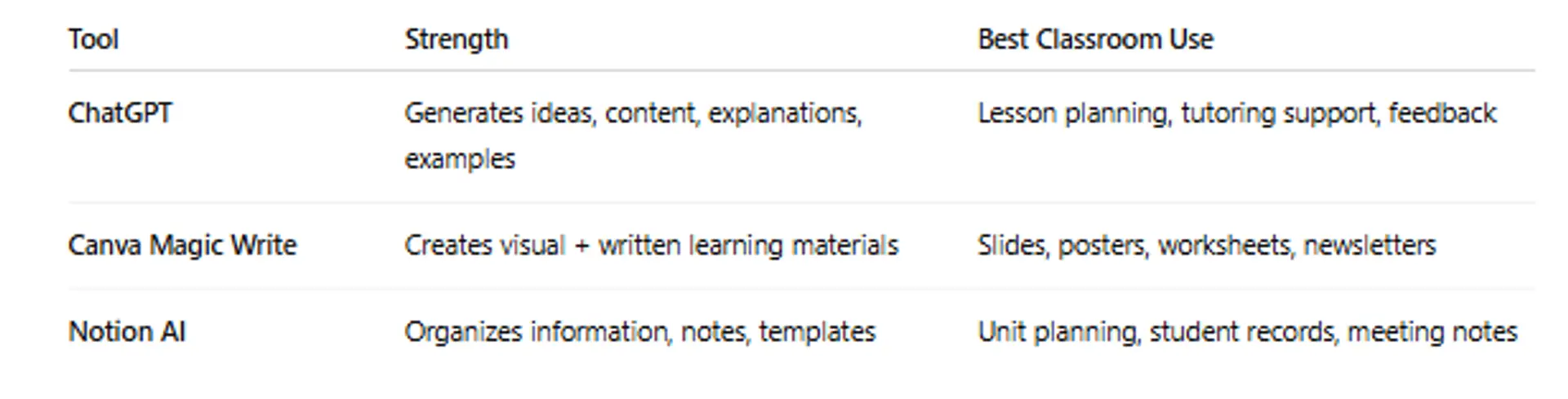
Together, these tools form an AI-powered teaching assistant that supports content creation, organization, and delivery.
2. Using ChatGPT in Teaching
Key Uses
- Lesson plan creation
- Differentiated instruction resources (beginner → advanced)
- Generating examples, analogies, and explanations
- Drafting quizzes, worksheets, rubrics, and model answers
- Creating revision summaries and study guides
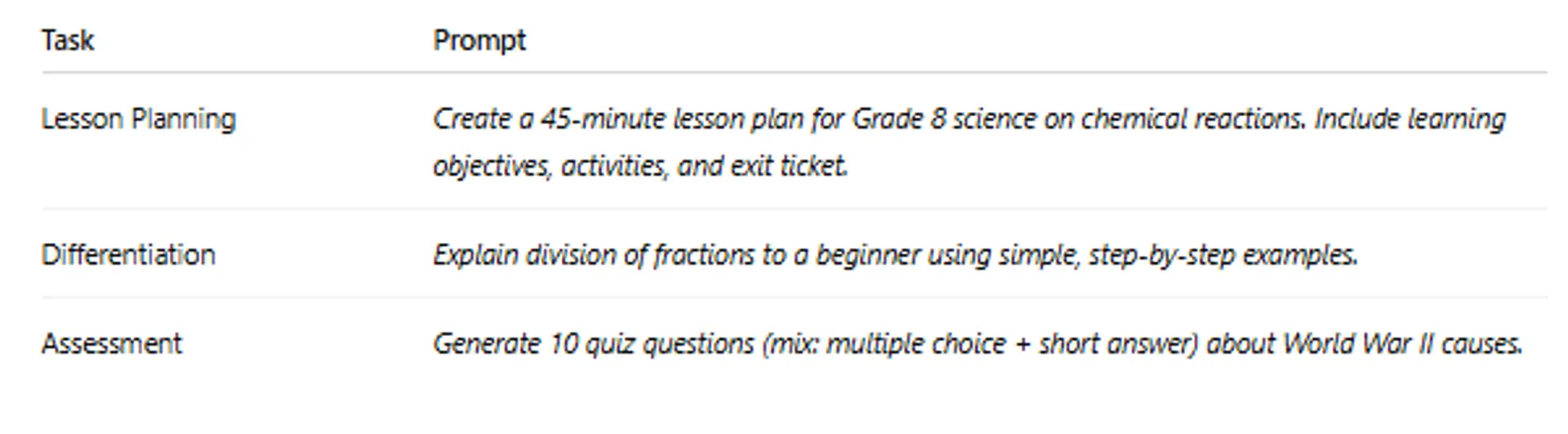
Effective Prompt Examples
Teacher Responsibility
✔ Review content
✔ Adjust for curriculum standards
✔ Simplify / clarify vocabulary
AI provides structure — teacher provides meaning.
3.Using Canva Magic Write
Canva Magic Write helps convert ideas into professional visual materials.
What It Can Create
- Slide presentations
- Handouts and worksheets
- Classroom posters
- Parent communication letters
- Infographics and concept maps
Example Prompt
Create a friendly classroom poster explaining the Water Cycle for Grade 6 students using simple language and colorful visuals.
Best Practices
- Keep text minimal and visual emphasis high
- Use consistent fonts and colors
- Ensure diagrams are age-appropriate
4. Using Notion AI for Teacher Organization
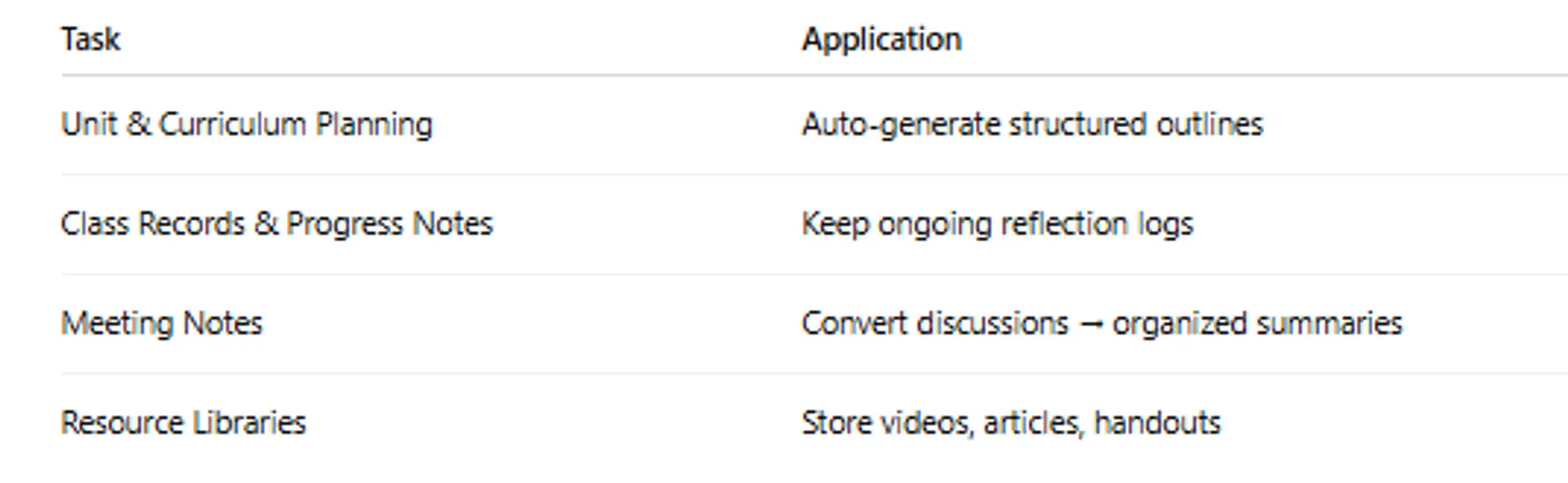
Notion AI helps plan, document, and manage teaching work.
Key Uses
Example Prompt
Convert this lesson reflection into bullet-point takeaways and student follow-up tasks.
(Paste your own text beneath the prompt.)
Why It Matters
- Reduces planning time
- Keeps teaching materials organized
- Helps track student support and progress
5. Integrating These Tools Into Daily Teaching Workflow
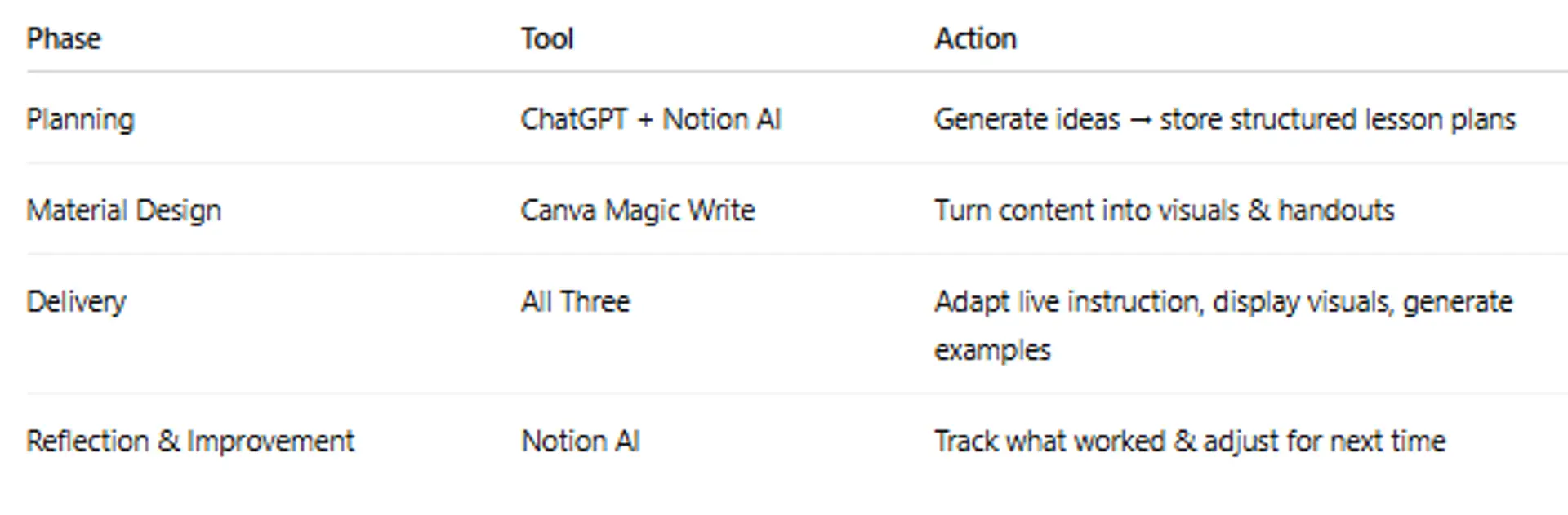
Goal: Make teaching efficient, not automated.
6. Supplementary Resources
- Using ChatGPT to Create Teaching Materials
- Generate teaching ideas with Magic Write | Canva for Teachers
- Organize Your Teaching Life with Notion: A Complete Guide
Lesson 3.3 Quiz — Using Canva Magic Write, Notion AI, and ChatGPT (10 Multiple Choice)
You must score 70% to pass.
This quiz counts toward your certification progress.
Click here for Quiz 3.3:
Conclusion
Canva Magic Write, Notion AI, and ChatGPT serve as powerful partners for educators, helping them plan better lessons, create engaging visuals, and stay organized. But AI does not replace teacher expertise — it amplifies it. The teacher’s role remains essential in ensuring accuracy, clarity, cultural relevance, and student-centered learning.
AI is the assistant.
You remain the teacher.
Next and Previous Lesson
Next:3.4: Designing AI-Assisted Online Courses
Previous: Lesson 3.2: Creating Interactive Materials (Slides, Videos, Games)
AI for Educators: Personalized Learning & Content Creation
Related Posts
© 2026 Invastor. All Rights Reserved
User Comments