
Ai Content Generator
Ai Picture
Tell Your Story

 InVastor Academy - (InVastor)
Module 3: Advanced Prompt Strategies, Lesson 3.1 — Zero-Shot, One-Shot, and Few-Shot Prompting
Module 3: Advanced Prompt Strategies
Lesson 3.1 — Zero-Shot vs One-Shot vs Few-Shot Prompting
Lesson Objective
By the end of this lesson, you will be able to:
- Differentiate between zero-shot, one-shot, and few-shot prompting techniques.
- Understand how ChatGPT-3.5, 4, and 5 interpret examples and patterns in prompts.
- Apply the correct prompting method to achieve consistency, tone control, and precision.
- Design structured example-based prompts that “train” ChatGPT to perform tasks exactly as you intend.
- Evaluate how the number and quality of examples affect AI reasoning and creativity.
1. The Science Behind Prompting
Prompting is not just typing questions — it’s instructing an AI model through structured language.
Think of it as teaching a new intern: the clearer your examples, the faster they learn your expectations.
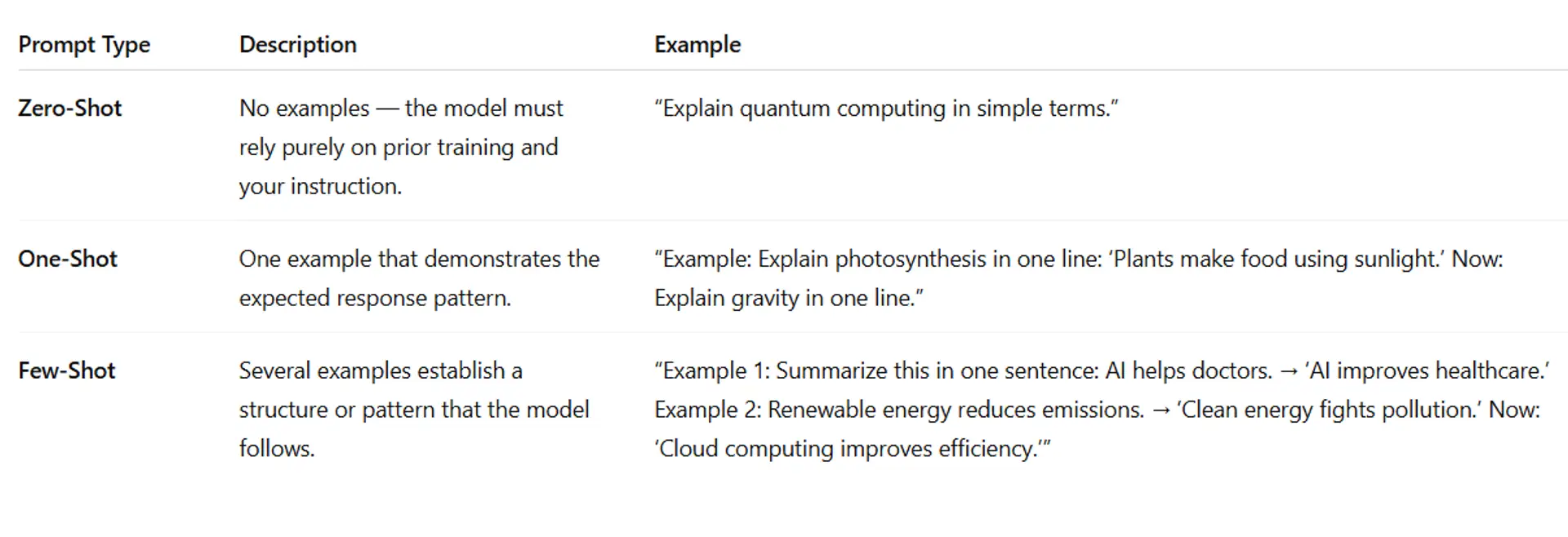
In natural language processing (NLP), the word “shot” refers to how many examples are provided before the model performs a task.
The more “shots,” the more context ChatGPT receives to infer patterns, styles, and logic.
Let’s break it down:
2. Why “Shots” Matter
When you provide examples, you’re giving the model contextual boundaries.
- Zero-shot = maximum freedom → can produce diverse or inconsistent results.
- Few-shot = maximum control → improves accuracy, structure, and tone.
Think of it like giving an artist instructions:
- Zero-shot: “Draw a house.”
- One-shot: “Here’s one drawing. Draw another in this style.”
- Few-shot: “Here are three examples of my design style — now create a new one that fits.”
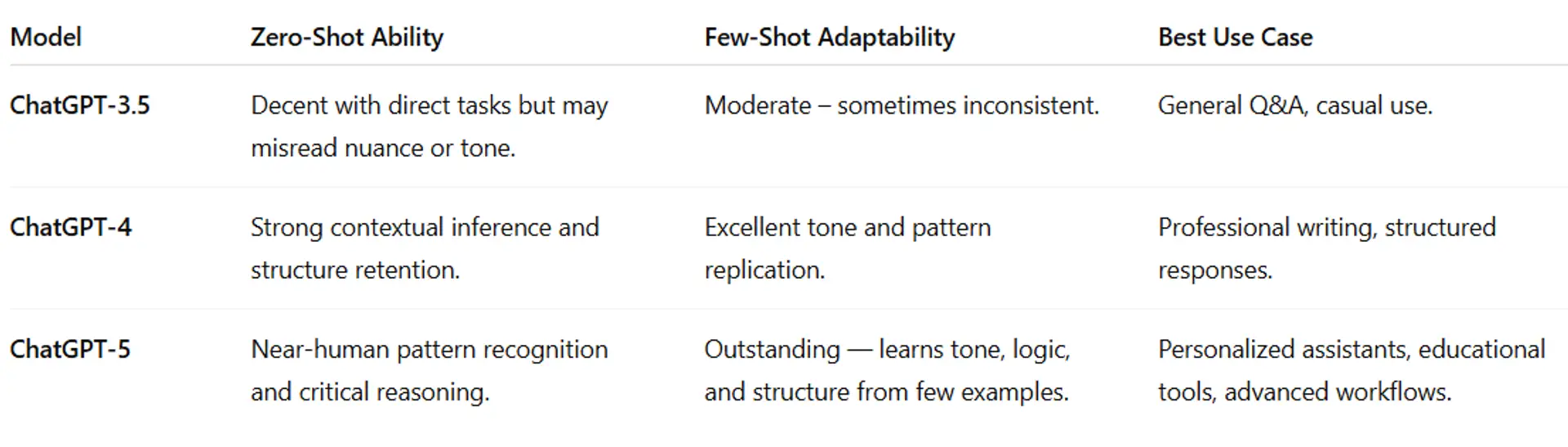
3. Comparing How ChatGPT Models Respond
💬 Insight:
GPT-5’s advanced “context window” allows it to process much longer and more complex prompt examples, meaning it can simulate learning behavior far beyond 3.5 or 4.
4.Real-World Applications of Each Method
a. Zero-Shot Prompting — “The Fast Command”
Used when you trust ChatGPT’s general knowledge.
Example:
“Explain the benefits of renewable energy in under 100 words.”
✅ Best for:
- Quick answers or brainstorming.
- Factual or straightforward tasks.
- When time matters more than style consistency.
⚠️ Limitations:
- May misunderstand your tone or intent.
- Lacks structural consistency.
b. One-Shot Prompting — “The Guided Example”
Used to teach ChatGPT how you want it to respond by showing one model example.
Example:
“Explain AI in one short sentence: ‘AI helps computers learn from data.’ Now: Explain blockchain in one short sentence.”
✅ Best for:
- When you want a consistent tone (e.g., simple, friendly, formal).
- Tasks that require a repeatable response style.
⚠️ Tip:
- Make your single example crystal clear — ChatGPT will copy both your structure and tone.
c. Few-Shot Prompting — “The Training Pattern”
Used when you want to train ChatGPT to follow a very specific style, tone, or logical pattern.
Example:
- Example 1: “Define AI: The science of making machines think.”
- Example 2: “Define Machine Learning: A method where systems learn patterns from data.”
Now: “Define Deep Learning.”
✅ Best for:
- Long-form content that needs tone uniformity (e.g., brand voice, teaching materials).
- Data formatting, translation, and reasoning tasks.
- Simulating “learning” or fine-tuning without real model training.
⚠️ Pro Tip:
- Few-shot prompting increases reliability but can reduce creativity if examples are too rigid — balance structure with freedom.
5.How to Create Effective Few-Shot Prompts
To create effective few-shot prompts, follow these key principles:
Use 3–5 Clear Examples:
- Provide several examples that show the model exactly what kind of response you expect. Too few examples = vague results; too many = repetition or confusion.
- Keep Format Consistent:
- Maintain the same structure, tone, and formatting across all examples. Consistency helps ChatGPT recognize the desired pattern.
Separate Each Example Clearly:
Use markers like ### or line breaks between examples. This helps the model distinguish each case.
Example:
Example 1
Question: What is AI?
Answer: AI is the science of creating intelligent machines.
Example 2
Question: What is ML?
Answer: ML is a subset of AI that learns from data.
End with a Clear Instruction:
After your examples, give a direct cue such as:
“Follow the same pattern and answer the next question.”
Test and Refine:
Try different combinations and compare results between ChatGPT-3.5, 4, and 5. Adjust examples until the model consistently produces the tone and structure you want.
6. Experimentation Example
Let’s test how results differ across prompt types.
Task: Explain “Quantum Computing” to a 10-year-old.
🟦 Zero-Shot Result (GPT-3.5):
“Quantum computing uses tiny particles to process information faster.”
🟩 One-Shot Result (GPT-4):
Example: “AI is like a brain for computers.”
Output: “Quantum computing is like magic math that helps computers think faster.”
🟨 Few-Shot Result (GPT-5):
Example 1: “Electricity powers our gadgets.”
Example 2: “AI helps computers think.”
Output: “Quantum computing helps computers solve puzzles too hard for normal ones.”
🧠 Analysis: The few-shot version captures the style and tone you intended (child-friendly and explanatory), proving the power of example-driven prompts.
7. Learn More with the Videos Below
They can learn additional concepts with the videos below:
- 🎥 Zero-shot, One-shot and Few-shot Prompting Explained
- 🎥 Master AI Prompting: Zero-Shot, Few-Shot & Chain of Thought Explained
- 🎥 How Examples Improve ChatGPT Output
Lesson Quiz 3.1
Please complete this quiz to check your understanding of the lesson. You must score at least 70% to pass this lesson quiz. This quiz counts toward your final certification progress.
Answer the quiz using the Google Form below.
Conclusion
Mastering zero-shot, one-shot, and few-shot prompting gives you complete control over how ChatGPT thinks, speaks, and reasons.
It’s the difference between asking for an answer and teaching the model how to answer like you would.
As you advance through this module, you’ll learn how to combine these prompting methods with system messages, style tuning, and API workflows to create powerful, customized AI assistants that behave exactly the way you envision.
📘 Next and Previous Lesson
Next - Lesson 3.2: Using system messages (in ChatGPT API) / setting tone and style
Previous - Lesson 2.4 — Avoiding Pitfalls & Common Mistakes
Course 1 Outline - Mastering ChatGPT: From Zero to Advanced Prompts & Applications
Related Posts
© 2025 Invastor. All Rights Reserved
User Comments