
Ai Content Generator
Ai Picture
Tell Your Story

 Cricut Setup
Cricut Design Space: All You Need to Know to Get Started
If you are a crafter, then you must have heard about the Cricut brand. It is a prestigious name for offering innovative and versatile crafting machines and supplies. Plus, for the convenience of the crafters, the brand offers the app, Cricut Design Space.
This app is crucial for crafters, as it comes with numerous functions. If you want to get started with the app, here is a well-curated write-up to help you gain a thorough understanding. So, let’s get right into it!
Cricut Design Space: Overview
Design Space is the brand’s companion app for cutting machines. With the help of this app, crafters can set up and operate their machines. It comes with various free resources to help you create DIY designs. Also, the app offers a subscription plan that enables crafters to access advanced features and resources within the app. Most Cricut cutting machines require Design Space for crafting, but some devices like Easy Press do not.
Key Features of Cricut Design Space
Below are some of the top features of the Cricut software you can use. All these features are free.
- The Cricut app comes with hundreds of free images, font styles, and ready-to-make projects.
- Its auto-sync option can help in syncing the app on multiple devices.
- It helps connect the Cricut Explore, Maker, Joy, etc., machines.
- Within the app, users can access an ample number of tutorials and video guides.
- It has many features that allow customization of a design or make it from scratch.
- Its tools, like kerning, spell check, and auto-save, help in creating eye-catching crafts.
Moreover, you can go to the Cricut Access subscription if you want to use more resources for your crafting.
Requirements to Use Cricut Software
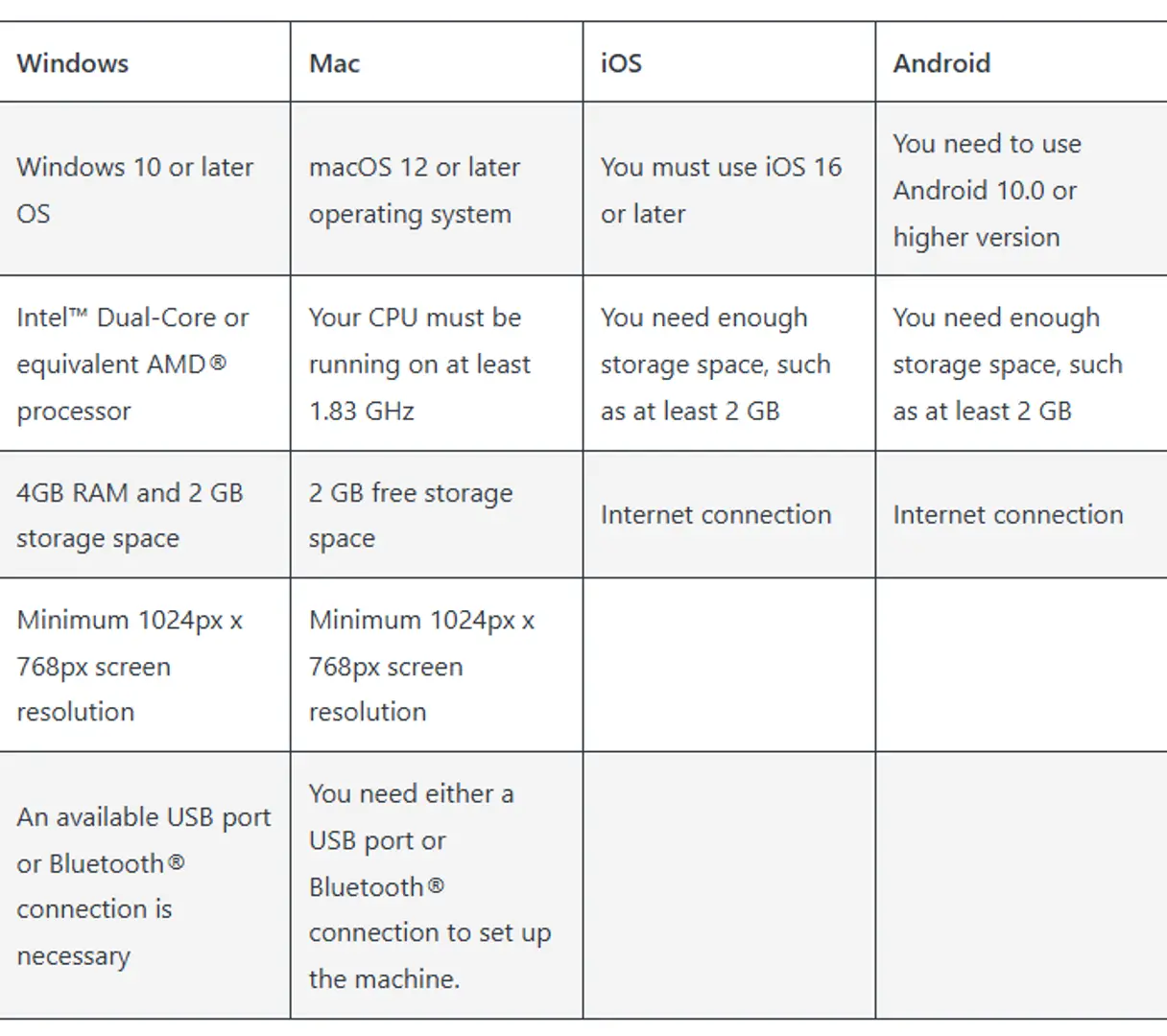
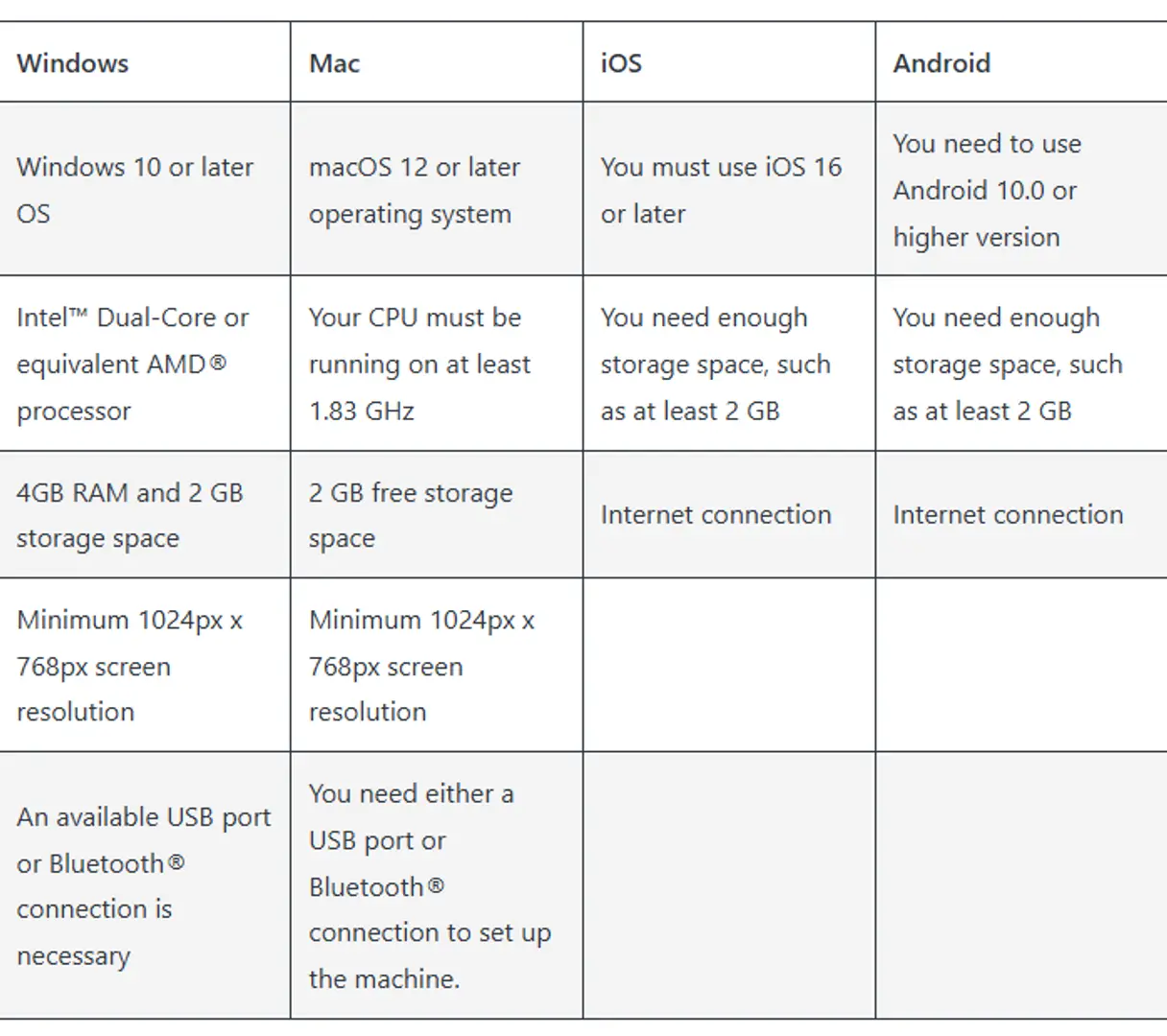
The Cricut app works perfectly on all the compatible devices, but it is necessary to fulfill the eligibility criteria to complete the installation. So, look at the requirements below before the Cricut Design Space download.
Cricut Machine Setup Using Design Space
With the Cricut app, you can complete the setup of your cutting machine on various operating systems such as Mac, Windows, iOS, and Android. Below, understand the process to complete the setup on a computer or smartphone easily.
Windows
There are three steps to complete the machine setup on your PC via the Cricut app. Here are the steps you can follow to do that.
- For the first step, you need to unbox your machine and prepare it for the connection.
- After that, go to the Bluetooth window on your device and then turn it on.
- Select the “Add a Bluetooth or other device” option.
- Once the machine is added via Bluetooth, you need to browse the brand’s official website.
- There, you need to search for the app and then download it on your device.
- Once the download is complete, open the app to complete the sign-in process.
- Then, select the Machine Setup option to complete your machine setup.
- Once the setup is successful, you can use the app and machine to turn your crafting ideas into reality.
Smartphone
Follow these steps to set up your machine on any compatible smartphone. (Make sure the mobile phone is compatible with the app.)
- First, go to the Settings section on your mobile to complete the Bluetooth connection between both devices.
- On your smartphone device, go to the application download function.
- Then, tap on the search section and then enter ‘Cricut Design Space.‘
- When the results appear on the screen, tap on the correct app icon.
- After that, select the option to start the downloading process.
- Wait for the download to complete; once the download is successful, the app will appear on the home screen.
- Tap on the app to open it and then complete the account sign-in process. (Create a new account if you are a new user.)
- Now, choose the Machine Setup option to complete the setup, and then choose the cutting machine you are using.
- Follow the steps to complete the setup process.
- You can create your first project when the machine setup is successful.
Frequently Asked Questions (FAQs)
How to Update Cricut Design Space?
Usually, the Cricut app gets updated automatically with the software update of your system. However, in some situations, you can face issues with your app update for many reasons. In this case, you need to perform the update manually. To update the app on your smartphone, you need to go to the application store, select the app, and tap on Update if it is available. For your Windows, you can download and install the latest app on your device.
Why Am I Unable to Install Cricut App on My Mac?
There could be several reasons why you are not able to download or install the app on your device. These are some top causes for that.
- Your device does not follow the eligibility criteria for downloading the app.
- The device is low on storage.
- Any firewall or security program is stopping you from installing the program.
- The device operating system is outdated or facing some technical problems.
- Your PC/smartphone does not support the Cricut app.
- You are following the wrong process when downloading or installing the app.
- When you are facing a network problem and more.
Can I Use My Cricut Machine Without Design Space?
Not all Cricut machines require the Cricut app to complete their setup and use. If you are using the cutting machines, then you need to download the app on your smartphone or PC. However, if you are using the head presses and other supplies, then it is not mandatory to use the app. In addition, various other dedicated apps are available for some specific machines. As a result, if you are planning to use the machine, then you must know which app you should use.
Source: Cricut Design Space: All You Need to Know to Get Started
Related Posts
© 2025 Invastor. All Rights Reserved
User Comments