
Ai Content Generator
Ai Picture
Tell Your Story


 Joseph Roberts
What’s the Difference Between Web Apps, Native Apps, and Hybrid Apps?
In today’s digital-first world, mobile applications are essential for businesses aiming to connect with users, enhance brand engagement, and drive conversions. However, choosing the right type of mobile application—web app, native app, or hybrid app—can be challenging. Each option comes with distinct advantages and limitations, influencing factors such as performance, user experience, and development costs.
Understanding the difference between these app types is crucial, especially for businesses comparing native vs hybrid mobile app development. Let’s break down what sets them apart and explore which might be right for your business needs.
What Is a Web App?
A web app is an application that runs in a web browser. It is not downloaded from app stores but accessed via URLs like any other website. These apps are typically built using HTML5, CSS, and JavaScript.
Key Features:
Platform-independent: Can run on any device with a web browser.
No installation needed: Accessible directly from a browser.
Easier to update: Since content is centralized, updates are instant for all users.
Pros:
Cost-effective and fast to develop.
Responsive design ensures compatibility across devices.
No app store approval process.
Cons:
Limited access to device hardware (camera, GPS, etc.).
Cannot work offline reliably.
Performance may lag behind native or hybrid apps.
Real-World Examples:
Twitter’s mobile site
Google Docs
Trello (Web version)
What Is a Native App?
A native app is built specifically for a particular operating system (iOS or Android). Developers use platform-specific languages and tools—Swift or Objective-C for iOS, and Java or Kotlin for Android.
Key Features:
Optimized performance: Designed specifically for one platform.
Full access to device features: Includes GPS, camera, microphone, etc.
Better user experience: Aligns with the OS’s design guidelines.
Pros:
High performance and fast response times.
Enhanced security.
Seamless integration with device hardware.
Cons:
Higher development cost due to separate codebases.
Longer development timelines.
Updates must go through app store approval.
Real-World Examples:
Spotify
What Is a Hybrid App?
Hybrid apps combine features of both web and native apps. They are essentially web apps inside a native shell, built using web technologies like HTML, CSS, and JavaScript but wrapped in a native container using frameworks such as Ionic, React Native, or Flutter.
Key Features:
Single codebase: Write once, deploy everywhere.
Cross-platform compatibility.
Access to device features through plugins.
Pros:
Faster development and reduced cost.
Quicker time to market.
Easier maintenance due to shared codebase.
Cons:
Performance can’t match fully native apps for complex tasks.
Dependency on third-party plugins for native features.
Limited UI consistency with each platform.
Real-World Examples:
Uber
Instagram (partially hybrid)
Gmail
Native vs Hybrid Mobile App Development: Key Differences
The native vs hybrid mobile app development debate boils down to performance, development time, and budget.
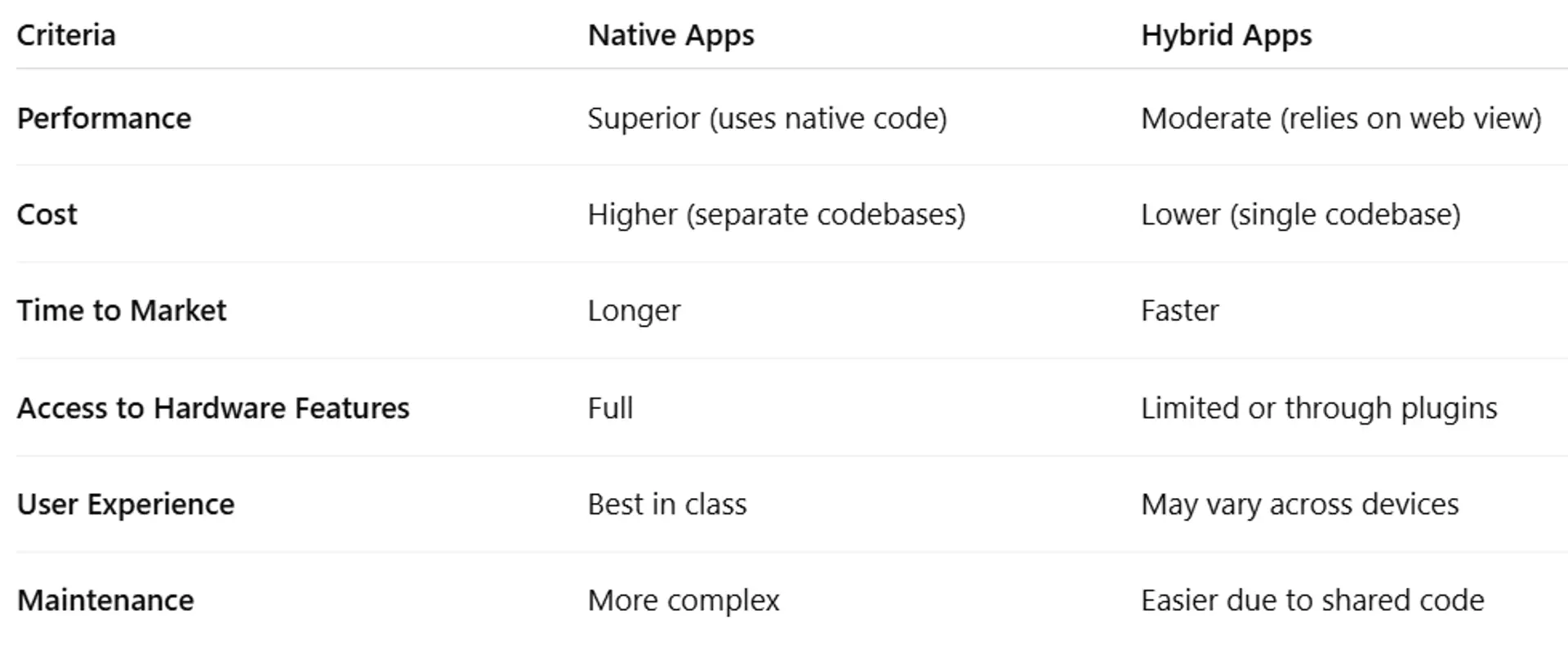
According to Statista, as of 2024, 42% of developers preferred using cross-platform frameworks like React Native or Flutter due to cost and speed advantages. Meanwhile, native development still dominates high-performance app segments such as gaming and enterprise tools.
Current Trends & Statistics
- React Native and Flutter are the two most popular hybrid frameworks in 2025, with Flutter slightly leading at 45% developer adoption.
- The global mobile app revenue reached $543 billion in 2024 and is projected to grow to $613 billion by 2025.
- Native apps still lead in terms of user engagement and session duration, with iOS apps averaging 5.7 minutes per session versus 4.2 minutes for hybrid apps.
Choosing the Right Type for Your Business
Here’s a quick decision guide:
Choose a Web App if:
- You need a quick, low-cost MVP.
- Your users primarily access content via browsers.
- Offline functionality isn’t crucial.
Choose a Native App if:
- You need top-notch performance and user experience.
- Your app requires extensive hardware integration.
- Your budget supports long-term maintenance.
Choose a Hybrid App if:
- You want to reach both iOS and Android with a single codebase.
- You have budget or time constraints.
- Your app doesn’t require highly complex UI or performance.
Final Thoughts
Each type of mobile app—web, native, and hybrid—serves a unique purpose. For businesses comparing native vs hybrid mobile app development, the choice should align with project goals, budget, and long-term scalability.
Native apps offer unmatched performance and integration but at a higher cost. Hybrid apps strike a balance between cost and functionality, making them ideal for many startups and SMEs. Web apps, while limited in functionality, provide an excellent entry point for digital services.
No one-size-fits-all solution exists, but by understanding these differences, you can make a well-informed decision that aligns with your business objectives in 2025 and beyond.
Related Posts
© 2025 Invastor. All Rights Reserved
User Comments