
Ai Content Generator
Ai Picture
Tell Your Story


 Somya Chawla
Difference Between OST And PST- Meaning And Main Features
If you have ever used Microsoft Outlook,you must have heard about the OST and PST files, the difference between OST and PST files. OST file stands for Offline Storage Table and PST file stands for Personal Storage Table.
These two types of files are used to save emails, calendars, contacts, and other Outlook data on the computer.OST and PST files are seen very similar, they both work in different ways.
To understand the difference between OST and PST File, we have to first understand what is an OST File and what is a PST File.
What is an OST(Offline Storage Table) FILE?
OST basically stands for Offline Storage Table. It is a file which is created in Outlook when the email account is connected with Microsoft Exchange, Office 365 and Outlook.com by using something called Cache Exchange Mode.
This file allows the users to work on their emails, calendars, contacts, and other items even if there is no internet connectivity.
When reconnected, the changes to the email server are synced back.
Main Features of OST(Offline Storage Table) File
After learning what OST file basically is, here are some following features of OST files:
- The changes done to the file are automatically saved locally and when the email server is connected, the files are synchronized to Outlook.
- OST Files saves contacts, data, calendars, notes, mails etc.
- OST( Offline Storage Table) can be archived and then they can be backed up in the Outlook PST (Personal Storage Table) file formats.
- OST files can save the data from Outlook Accounts, IMAP and Exchange Office 365.
- The size of OST files can also be minimized if a user wants to minimize it.
Advantages Of OST File
- OST files support offline work.
- It automatically syncs with the mail server.
- It is more suitable for large and complex email environments.
Disadvantages OF OST File
- OST files cannot be directly imported into Outlook.
- OST files are tied only to one account and one system.
- In OST files, recovery without server connection is a little difficult.
What is a PST (Personal Storage Table) File?
PST basically stands for Personal Storage Table. It is used by Microsoft Outlook as a file format to store the copies of your email data, calendar events, contacts etc on the user’s local computer.
They are basically used for POP3 email accounts or when you want to backup your emails.
Main Features Of PST (Personal Storage Table) File
After learning what PST file basically is here are some features of PST File:
- People can create and manage PST files manually for the backup.
- PST files can be copied and can be opened on another computer using Outlook.
- The Outlook data can be locally stored on the PST files and are not connected to an Exchange Server.
- PST files can be easily moved to other systems or devices.
Advantages Of PST Files
- PST files are easy to backup and transfer the data.
- PST files help in archiving the old items.
- PST files can be opened on any Outlook installation.
Disadvantages Of PST Files
- PST files cannot be synced with the server and are more prone to data loss.
- The corruption risk increases with the large size of PST files.
- PST files require manual management.
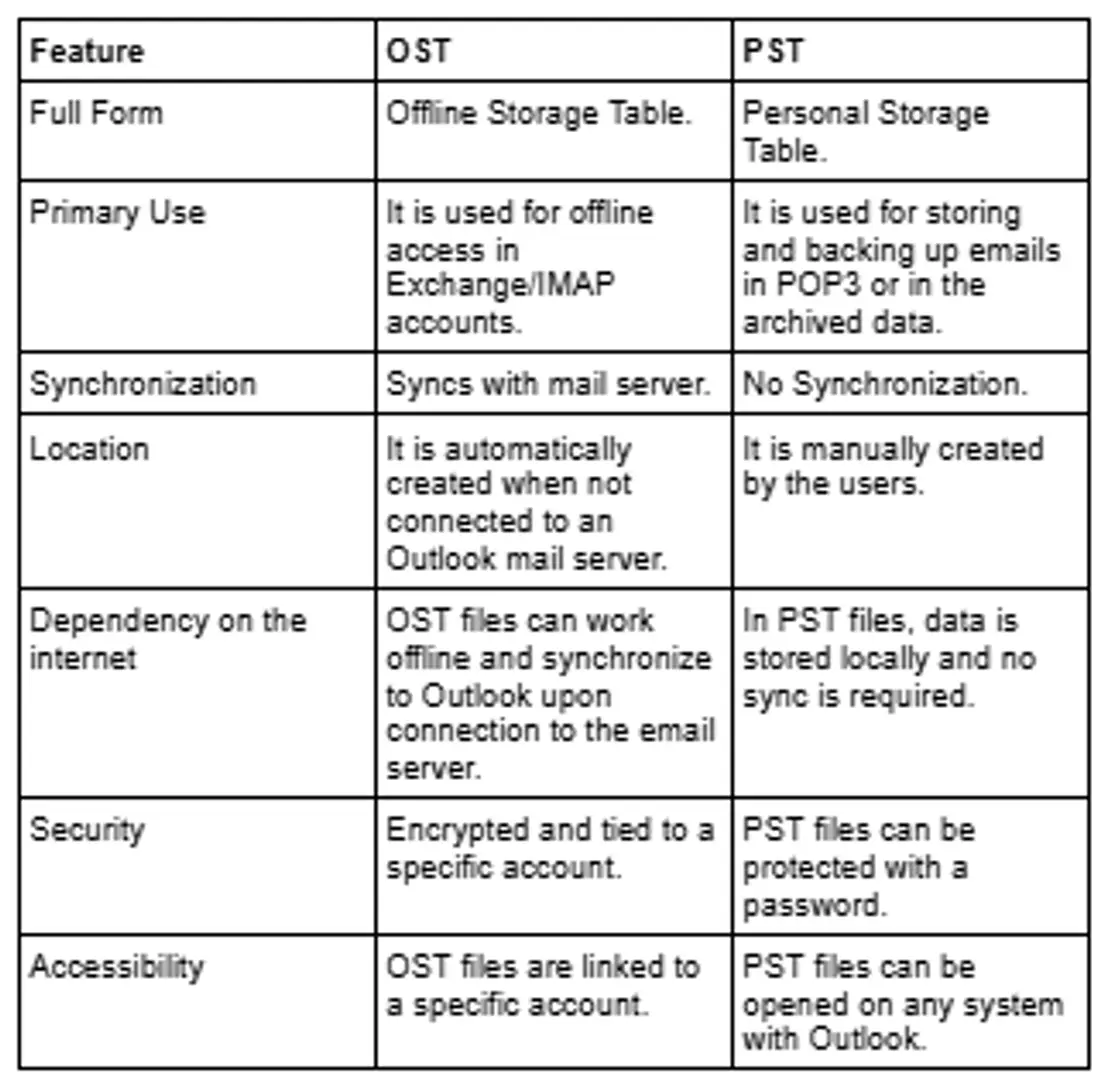
OST VS PST File Difference
After learning the advantages and disadvantages of OST and PST files, here is the main OST VS PST File difference:
When To Use OST AND PST File
After learning the difference between OST and PST file, the main features, the advantages and disadvantages, now we need to learn about when to use OST and PST file.
When to Use an OST File?
- When a person is using Microsoft or Office 365.
- If a person needs to work offline or sync the work later.
- If a person is a part of an enterprise environment where centralized email management is essential.
When to Use a PST File?
- When a person uses a POP3 email account.
- PST Files are used to archive old emails to free up space on the server.
- PST files are used to transfer and backup email data from computers.
Conversion between OST And PST
After reading about the OST VS PST File difference, you need to learn about the conversion between them.
Most of the users need to convert their files from OST to PST for recovery, backup or migration purposes, so here we provide the best solution for conversion of OST and PST files that is:
BitRecover OST to PST Recover Tool
This tool converts emails,contacts, journals etc. from OST to PST file.
There is no size limitation for OST files.
Keep OST email attachments in the original file formats (PDF, PPT etc.)
Conclusion
After studying about the difference between OST and PST, when to use OST and PST, its features and OST vs PST file difference, we know that understanding the difference between the OST file and the PST file for efficient management of Outlook. OST files are ideal for the server synced environment and provide offline access whereas PST files are best for transferring and archiving the data. Proper use of each file ensures the data security, reliability, accessibility which help people get the most out of Microsoft Outlook.
Related Posts
© 2025 Invastor. All Rights Reserved
User Comments